

 Log In
Granawin App
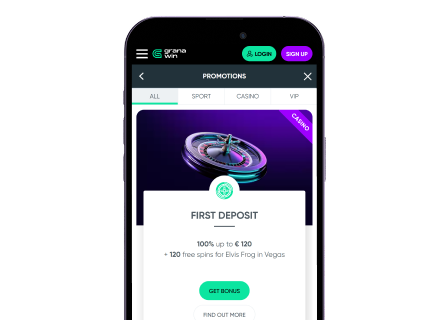
Granawin lands as a mobile-first casino that behaves like an app without an App Store listing. From New Zealand, the site loads fast, menus are uncluttered, and gameplay moves smoothly on mid-range phones.
There isn’t a native download, but the Progressive Web App and home-screen shortcut give an app-like feel. For gamblers who prefer quick access without the storage fuss, this setup works well. Below, we explain how to set it up on iPhone and Android, what betting markets look like on the app, and which casino games are available on mobile.
Granawin On iPhone: What To Expect Before You Tap Install
Granawin does not currently offer an app in the App Store, so the site leans on a Progressive Web App (PWA) approach. What it means is that on iPhones, you’ll use Safari to get the same features as an app, as there isn’t a Granawin iOS package to fetch from Apple. The benefit is instant access, but the trade-off is no native App Store listing or auto-updates via Apple channels.
How To Download And Install?
There’s nothing to “download” from the App Store. Instead:
- Open Safari.
- Go to the official Granawin site.
- Tap the “Share” icon.
- Choose “Add to Home Screen”.
This creates a home-screen shortcut that looks and behaves a lot like an app. It’s fast and takes under a minute. For many bettors, this is enough — think of it as a tidy shortcut that saves browser clicks.
System Requirements
Any modern iPhone with iOS 13 or later and a stable internet connection works best. While Safari handles the PWA-like shortcut smoothly, if your phone is a few years old, expect slightly longer load times on very heavy live-dealer tables.
Compatible Devices
All recent iPhones and iPads are supported, since the experience runs inside Safari. Smaller and older iPads are fine for slots, while live casino plays better on larger screens.
Sign UpGranawin On Android: The Browser Shortcut And The APK Question
Android users get the same app-like behaviour through Chrome’s “Add to Home Screen” feature. Some third-party sites mention a Granawin APK, but using the official site shortcut is the cleaner route for updates and security. Remember, if there is an APK available, the official Granawin website would be the first to announce and display it. If it’s not the site, it does not exist.
How To Download And Install?
- Open Chrome, go to Granawin, and tap “Play Mobile”.
- Tap the 3-dot menu and choose “Add to Home Screen”.
- Confirm and name the shortcut, then launch from the home screen.
This method avoids unknown APK files and keeps everything browser-managed.
System Requirements
Modern Chrome or Firefox (last 2 major versions) on Android 8 or newer gives the smoothest PWA behaviour. Devices with 3GB of RAM or more handle live-casino tables best, but mid-range phones work fine for slots.
Compatible Devices
From budget phones to flagships, if your browser is up-to-date, Granawin behaves well. Older Android versions may show quirks, but most devices sold in the last 3–4 years run perfectly.
Mobile Website Version: What Granawin’s Mobile Site Feels Like
Granawin’s mobile presence is a Progressive Web App built with HTML5, so you get a near-native feel:
- That includes scalable menus, quick-loading pages, and home-screen shortcuts.
- There’s no need to search for “Granawin App” in an app store — the site is the product.
- From NZ, the interface shows markets and casino lobbies clearly, and currency flows handle NZD in many places.
- Navigation is simple: top menu, quick filters for slots or live, and a visible Play Mobile prompt to create the home-screen shortcut.
Mobile Betting Options: Sports Markets And In-Play That Fit A Phone Screen
The sportsbook is integrated into the same mobile interface as the casino, meaning that you get the same smooth sportsbook as the desktop version:
- Markets cover major codes (football, rugby, cricket — handy for Kiwis), and live betting is present in the live section.
- Odds and markets expand during big events, and in-play features load quickly.
- If you’re here for live bets, use Wi-Fi for stability during a fast-moving match.
Mobile Casino Options: Pokies, Table Games, And Live Dealers With Quick Access
Most users’ first worry is a depleted casino section on mobile. However, at Granawin, that is not the case at all:
- Game libraries list titles from many well-known suppliers, including Evolution, Playtech, Ezugi, BGaming, and more.
- Slots, video poker, and classic table games are easy to filter on mobile. Our tests confirmed the availability of all major titles across categories on mobile.
- Demo mode often lets you try titles without signing in.
- Live-dealer sections open in dedicated lobbies where tables show current round details.
- Load times for normal slots average around 3 seconds on mid-range 4G and faster on Wi-Fi.
- Promotions change often. Recent pages showed welcome packages with a 100% match and multi-deposit packages that include free spins. Typically, promotions are shown with clear wagering notes, so check each bonus page for requirements.
- Punters can filter games by provider, volatility, or features to narrow choices quickly.
Frequently Asked Questions
Is There a Granawin App That I Can Download From Apple or Google Stores?
Can I Install an APK for Granawin on Android?
How Do I Download Granawin to My Phone?